

Guide info: Every size figure in this guide is measured from real Samsung firmware packages, not estimated.
Table of contents
- Quick answer
- The four files, and what each one does
- What a real firmware package actually weighs
- Inside one real package, file by file
- What happens if you flash only one file?
- CSC or HOME_CSC: choosing inside the package
- How to read a Samsung firmware file name
- How the files map to Odin’s slots
- Why the model and region must match exactly
- Frequently asked questions
Quick answer
A Samsung firmware package contains four component types: BL (Bootloader), AP (Application Processor — the Android system), CP (Communication Processor — the modem), and CSC (region customisation). Each loads into its own slot in Odin. Most packages also include a HOME_CSC, an alternative to CSC intended to preserve your data. AP is by far the largest file: measured across the packages measured, it accounts for a median 94.1% of the entire download.
What you’ll learn
- What BL, AP, CP and CSC actually stand for — and the naming error most guides repeat
- Why the AP file is so much bigger than the rest, with measured figures
- What happens if you flash only one of the files
- How to choose between CSC and HOME_CSC
- How to decode a Samsung firmware file name
- What is really inside a package, shown from a real unpacked archive
The four files, and what each one does
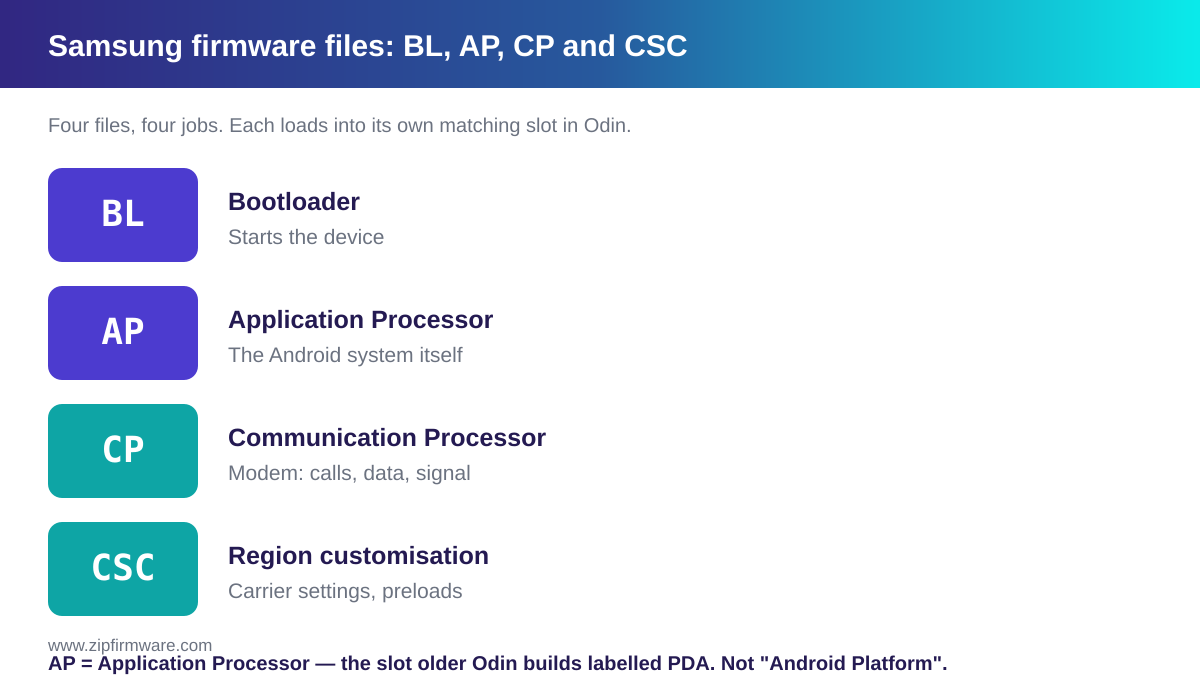
A full Samsung firmware package contains four component types. Each loads into its own matching slot in Odin.
| File | Stands for | Responsible for |
|---|---|---|
| BL | Bootloader | The low-level code that starts the device |
| AP | Application Processor | The Android system itself — by far the largest file |
| CP | Communication Processor | Modem and baseband: calls, mobile data, signal |
| CSC | Region customisation | Carrier settings, regional defaults, preloaded apps |
A correction worth making explicitly. AP stands for Application Processor. In older Odin builds this slot was labelled
PDA, and you will still see that name used. It does not stand for “Android Platform” — a common error that spreads between guides.
What a real Samsung firmware package actually weighs
Most guides describe these files. This section measures them.
The figures below come from Samsung firmware packages indexed by ZipFirmware. Every number is the size of a real file inside a real package, not an estimate.
| File | How often present | Median size | Smallest seen | Largest seen |
|---|---|---|---|---|
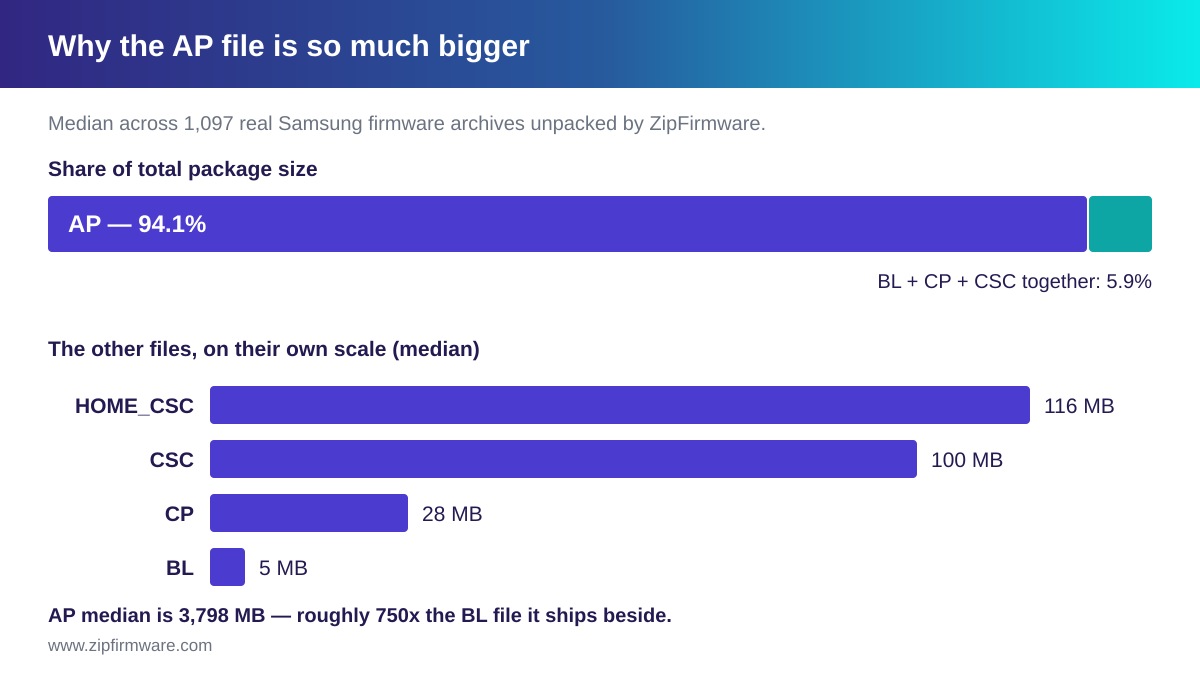
| AP | Always | 3,798 MB | 535 MB | 21 GB |
| HOME_CSC | Most packages | 116 MB | 1.4 MB | 702 MB |
| CSC | Always | 100 MB | 1.4 MB | 702 MB |
| CP | Nearly always | 28 MB | 9 MB | 73 MB |
| BL | Always | 5.0 MB | 1.0 MB | 99 MB |
Why is AP so much bigger than the rest?
Because AP carries the operating system itself, while the others carry comparatively small, specialised payloads.
Across the packages measured, AP accounts for a median 94.1% of the entire download. A typical AP file is roughly 750 times the size of the BL file it ships beside.
That single figure explains a lot of practical behaviour: it is why firmware downloads are measured in gigabytes, why extraction takes minutes, and why a slow connection stalls on AP rather than on the other three combined.
Three findings from the data worth knowing
- Roughly one package in five has no HOME_CSC. If yours does not, a clean CSC flash is your only option in that package — “just use HOME_CSC to keep my data” is not always available.
- CSC and HOME_CSC are almost the same size. Their medians differ by about 16 MB, and in individual packages the two files are often within a fraction of a percent of each other. They carry the same region payload; what differs is what the flash is instructed to do, not the content volume.
- A few packages have no CP at all. A device with no cellular modem has no modem firmware to ship.
How many files should your package contain?
| Files in package | How common | What it means |
|---|---|---|
| 5 | The usual case | BL, AP, CP, CSC and HOME_CSC — the full set |
| 4 | Fairly common | Typically no HOME_CSC |
| 3 | Uncommon | A component such as CP is absent for that device |
If your download contains four files rather than five, nothing is missing or broken. Compare against the table above before assuming the archive is incomplete.
Inside one real package, file by file
Here is a complete, unedited manifest from a single archive: a Galaxy A13 5G (SM-A136W) build for the VMC sales code.
| Slot | File name | Compressed | Unpacked |
|---|---|---|---|
| BL | BL_A136WVLSFDYI3_A136WVLSFDYI3_MQB102349269_REV00_user_low_ship_MULTI_CERT.tar.md5 |
1.7 MB | 2.0 MB |
| AP | AP_A136WVLSFDYI3_A136WVLSFDYI3_MQB102349269_REV00_user_low_ship_MULTI_CERT_meta_OS13.tar.md5 |
3.8 GB | 4.8 GB |
| CP | CP_A136WVLSFDYI3_CP31854047_MQB102349269_REV00_user_low_ship_MULTI_CERT.tar.md5 |
34 MB | 39 MB |
| HOME_CSC | HOME_CSC_OYV_A136WOYVFDYI3_MQB102349269_REV00_user_low_ship_MULTI_CERT.tar.md5 |
321 MB | 362 MB |
| CSC | CSC_OYV_A136WOYVFDYI3_MQB102349269_REV00_user_low_ship_MULTI_CERT.tar.md5 |
321 MB | 362 MB |
Several things in that table are worth pausing on.
- AP dwarfs everything else — 3.8 GB against BL’s 1.7 MB, in the same package.
- CSC and HOME_CSC differ by about 17 KB out of 321 MB. That is the clearest possible demonstration that they are the same payload with different instructions.
- Both region files carry
OYV, not theVMCsales code the build is listed under. That is multi-CSC at work — see Samsung CSC codes explained. - The AP name ends
_meta_OS13, marking the Android generation the package targets.
A second, older example shows how packages differ. A Galaxy A5 (2016) build (SM-A510F, TUR) contains only four files — no HOME_CSC:
BL_A510FXXS8CTI3_...tar.md5— 1.5 MBAP_A510FXXS8CTI3_..._meta.tar.md5— 1.8 GBCP_A510FXXU8CSK2_..._SIGNED.tar.md5— 14 MBCSC_OJV_A510FOJV8CSD1_...tar.md5— 93 MB
Note also that its CP and CSC carry different build identifiers from its AP. The components of a package do not all have to be built at the same revision.
What happens if you flash only one file?
Odin lets you load one slot and flash it alone. The consequences differ sharply per file, and it is worth understanding them before you try it.
BL alone
The bootloader is what starts everything else, so a bootloader that does not match the system it has to start is the mismatch with the most serious consequences. It is also where anti-rollback protection applies: a bootloader older than the one installed can be rejected outright — see the bootloader version guide.
A device left unbootable this way is not necessarily beyond help — a service centre has recovery methods an owner does not. But it is the case most likely to move beyond what you can fix yourself, which is reason enough not to flash BL on its own without a specific need.
AP alone
AP carries the main system software, so an AP-only flash is what people reach for when they want to reinstall the system without touching region settings. The four files are distributed together as one release; flashing one leaves the rest at their previous versions, which is a combination the package was not shipped as.
That may work. It is simply less predictable than flashing the set.
CP alone
CP holds the modem software, so a CP-only flash affects cellular behaviour: signal, mobile data, calls. Whether a given CP behaves correctly alongside a different AP or BL version is not guaranteed either way, and it varies by device.
CSC alone
A CSC flash changes region customisation. The data consequence depends on which of the two region files you use, and you can tell them apart by name:
- A file beginning
CSC_performs a factory reset. - A file beginning
HOME_CSC_is intended to preserve your data — conditionally, as explained below.
The safe default
Flash the complete set that shipped together unless you have a specific reason not to, and back up first. See how to flash Samsung firmware with Odin for the procedure.
CSC or HOME_CSC: choosing inside the package
Both target the same Odin slot. You load exactly one.
- CSC performs a factory reset as part of the flash. It is the predictable option, and the one required when you are genuinely changing region.
- HOME_CSC is intended to skip that reset and keep your data — but only when the CSC already installed matches the one you are flashing. Flashing a different region’s HOME_CSC can still wipe the device.
That conditionality is the most misreported fact about these two files. HOME_CSC is not a guaranteed “keep my data” switch, and the condition is something most people cannot confirm in advance.
Two further points come straight from the package data above:
- HOME_CSC is not always present. Where it is absent, a clean CSC flash is the only option that package offers.
- The two files are nearly the same size because they carry the same region payload. What differs is what the flash is instructed to do, not the volume of content.
Back up before you flash, whichever you choose. For the CSC system itself — sales codes, multi-CSC, how to read yours — see Samsung CSC codes explained.
How to read a Samsung firmware file name
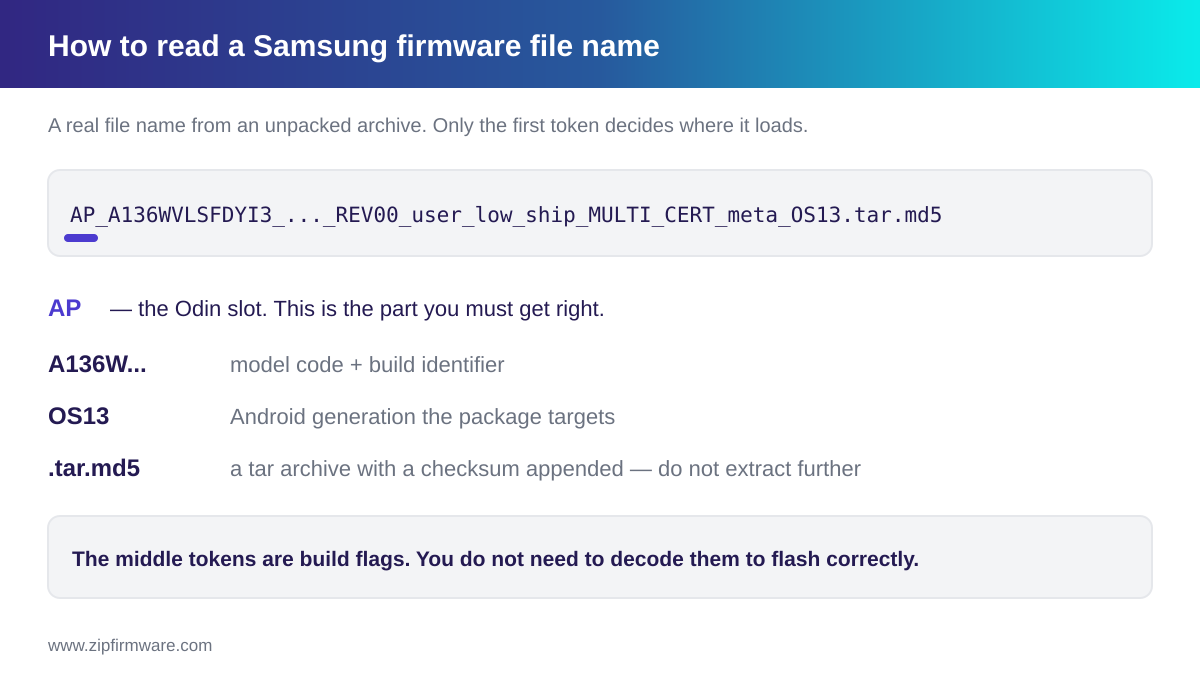
File names look intimidating, but only the first token matters for flashing. Here is a real name from an unpacked archive:
AP_A136WVLSFDYI3_A136WVLSFDYI3_MQB102349269_REV00_user_low_ship_MULTI_CERT_meta_OS13.tar.md5
| Part | What it tells you |
|---|---|
AP_ |
The Odin slot. This is the part you must get right |
A136WVLSFDYI3 |
Model code and build identifier |
REV00 |
A revision field |
user, low_ship, MULTI_CERT, meta |
Build flags — informational |
OS13 |
The Android generation the package targets |
.tar.md5 |
A tar archive with a checksum appended |
You only need the leading token. A file starting BL_ goes in the BL slot, AP_ in AP, and so on. The middle tokens are build configuration; you do not need to decode them to flash correctly, and guides that claim precise meanings for each are usually guessing.
Do not extract the .tar.md5 files. The checksum appended to the archive is what lets Odin verify the file before writing it. Odin loads these exactly as they come out of the ZIP — only the outer .zip gets extracted.
How the files map to Odin’s slots
Odin presents four buttons, and the mapping is one-to-one with the file name prefixes:
| Odin button | Load the file starting with | Notes |
|---|---|---|
| BL | BL_ |
— |
| AP | AP_ |
Largest file; takes longest to load and to write |
| CP | CP_ |
Absent for devices with no cellular modem |
| CSC | CSC_ or HOME_CSC_ |
Load exactly one, never both |
There is no separate HOME_CSC button. Both region files go into the CSC slot, and choosing between them is how you decide whether the flash resets the device.
Older Odin builds label the AP slot PDA. If you see that, load the AP_ file there.
Why the model and region must match exactly
Firmware is published per exact model and region. The trailing letters of a model number distinguish hardware variants sold in different markets, and those variants do not share firmware.
Two consequences follow:
- A package built for a different model can fail to flash, or leave the device unbootable. This is a leading cause of serious problems during flashing.
- A package built for a different region will change your region settings — and, depending on which region file you load, may reset the device.
Confirm your model number and CSC before downloading. If you are unsure of either, see how to check your Samsung firmware version.
Frequently asked questions
What does AP stand for in Samsung firmware?
Application Processor. It carries the main Android system image and is the largest file in the package. Older Odin builds label this slot PDA. It does not stand for “Android Platform”.
Why is the AP file so large?
Because it contains the operating system itself, while the other files carry small, specialised payloads. Across the packages measured, AP is a median 94.1% of the total package — roughly 750 times the size of the BL file beside it.
Do I need all four files?
Flashing the complete set that shipped together is the predictable option. Single-file flashes are possible but leave the remaining components at their previous versions.
What is the difference between CSC and HOME_CSC?
CSC performs a factory reset. HOME_CSC is intended to preserve your data, but only when the CSC already installed matches the one being flashed. Back up either way.
My download only has four files. Is it incomplete?
Probably not. Five files is the usual case; four is fairly common, usually because there is no HOME_CSC. A few packages contain three, where a component such as CP does not apply to that device.
Can I extract the .tar.md5 files?
You should not. Odin loads them as they are, and the appended checksum is what lets it verify each file. Only the outer .zip gets extracted.
Which file updates the modem?
CP, the Communication Processor. It corresponds to the baseband version shown on your device.
Can I mix files from different firmware versions?
It is possible to load components from different releases, but they were distributed as a set and mixing them is less predictable. If you are troubleshooting rather than experimenting, use one complete package.
Research note
This article combines official Samsung documentation with analysis of firmware metadata indexed by ZipFirmware. Where a statement is based on measured data, the article identifies it as measured; where something is not publicly documented, we say so rather than presenting a guess as fact.
Final thoughts
Once you know that AP is the system, BL is the bootloader, CP is the modem and CSC is your region — and that the leading token of each file name tells you exactly where it goes — the rest of the flashing process stops being mysterious.
The measured figures in this guide exist because ZipFirmware indexes the packages it publishes. If you want to see the component breakdown for a specific build, look it up in the firmware archive.
Related reading:
ZipFirmware
We maintain the ZipFirmware archive of official Samsung stock ROMs. Every guide here is written from the same files you download.