

Guide info: Covers One UI 7–8.5 (Android 15–16) and One UI 9 (Android 17). Data in this guide is drawn from 599 verified CSC codes and live Samsung firmware records held by ZipFirmware.
⚠️ Before you act on this: Changing your CSC means flashing a different region’s firmware, which erases the device. Read the section on changing CSC before you download anything.
Table of contents
- Quick answer
- What is a Samsung CSC code?
- CSC vs HOME_CSC: the difference that costs people their data
- Multi-CSC: why one firmware serves many countries
- Reading the CSC out of a real firmware string
- How to check which CSC your phone is using now
- Finding the original CSC your device shipped with
- Can you change your Samsung CSC?
- What your CSC actually controls
- Samsung CSC codes by country
- Common CSC mistakes
- Frequently asked questions
Quick answer
A Samsung CSC code is a short code, normally three letters, that identifies the regional or carrier software package your Galaxy device runs. It controls which software updates you receive and when, which carrier features such as VoLTE and Wi-Fi calling are enabled, which apps are preloaded, and which region-specific behaviour applies. You can check yours under Settings → About phone → Software information, in the Service provider SW ver. entry. Changing it requires flashing the target region’s full firmware, which erases the device.
What you’ll learn
- What a Samsung CSC code is and what it actually changes on your device
- The difference between CSC and HOME_CSC, and why it decides whether your data survives
- What Multi-CSC means, shown with real firmware data rather than a copied list
- How to read the CSC directly out of a Samsung firmware version string
- How to check your current CSC, and how it differs from your original sales code
- Whether you can change your CSC, and what it costs you
What is a Samsung CSC code?
CSC is commonly expanded as Country Specific Code or Consumer Software Customisation; both expansions circulate widely and Samsung does not publish a single canonical one. What matters is the function, not the acronym.
A Galaxy device is not sold as one uniform product worldwide. The same model number can ship to dozens of markets, each with different carrier requirements, regulatory rules, preloaded applications and update schedules. Rather than building a separate device for each, Samsung ships one hardware variant and layers a regional configuration on top. That configuration is the CSC.
Two identical Galaxy handsets, one bought in Germany and one in Saudi Arabia, can therefore behave differently: different preloaded apps, different calling features, and updates arriving weeks apart.
ZipFirmware currently tracks 599 distinct CSC codes. Every one maps to a country, and most map to a named set of carriers. The scale is the point: this is a large, granular system, and picking the wrong code is a frequent cause of a failed firmware flash.
CSC vs HOME_CSC: the difference that costs people their data
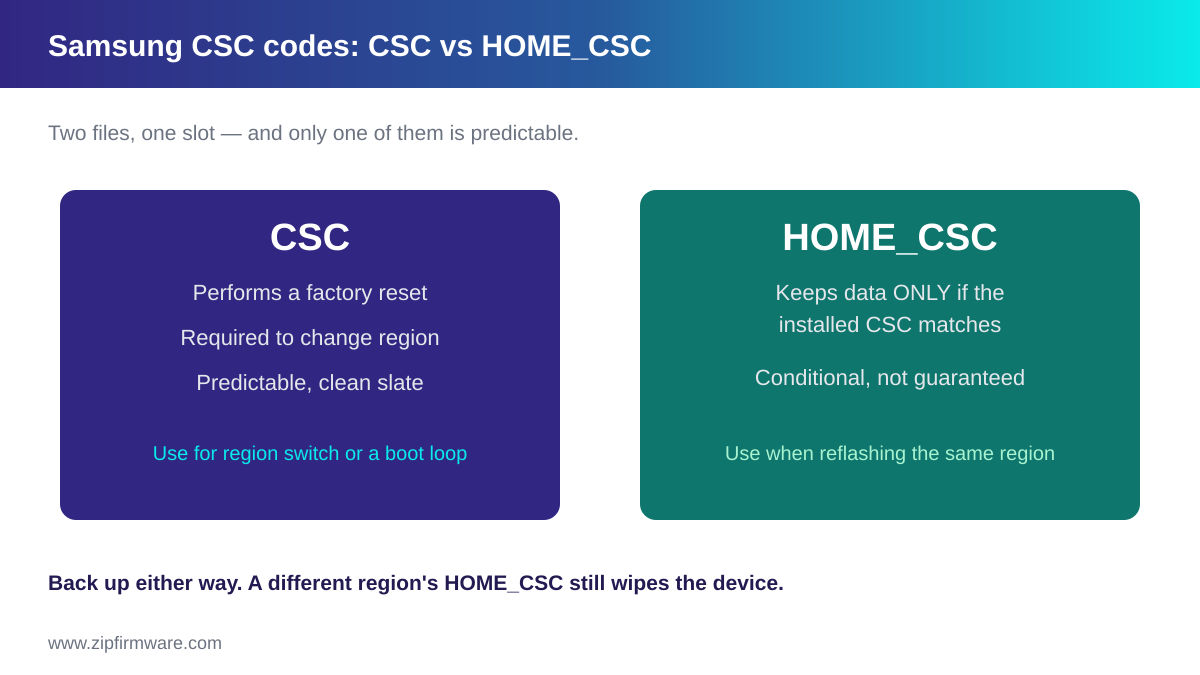
When you extract a full Samsung firmware package you get several files, and two of them relate to region: CSC and HOME_CSC. You load exactly one of them, into the same slot. Which one you choose decides whether your data survives.
- CSC performs a factory reset as part of the flash. Photos, apps, messages and settings are erased. This is the predictable option and the one required when you are genuinely changing region.
- HOME_CSC is intended to skip that reset and preserve your data — but only when the CSC already installed matches the one you are flashing. Flashing a different region’s HOME_CSC can still result in a full wipe.
This conditional behaviour is the single most misreported fact about CSC files. HOME_CSC is not a guaranteed “keep my data” switch; it is a conditional one, and the condition is something most people cannot confirm in advance.
Back up before you flash, whichever file you choose.
For the flashing procedure itself, see how to flash Samsung firmware with Odin. For what the other files do, see Samsung firmware files explained.
Multi-CSC: why one firmware serves many countries
This is the part most guides get wrong, and it is the source of most CSC confusion.
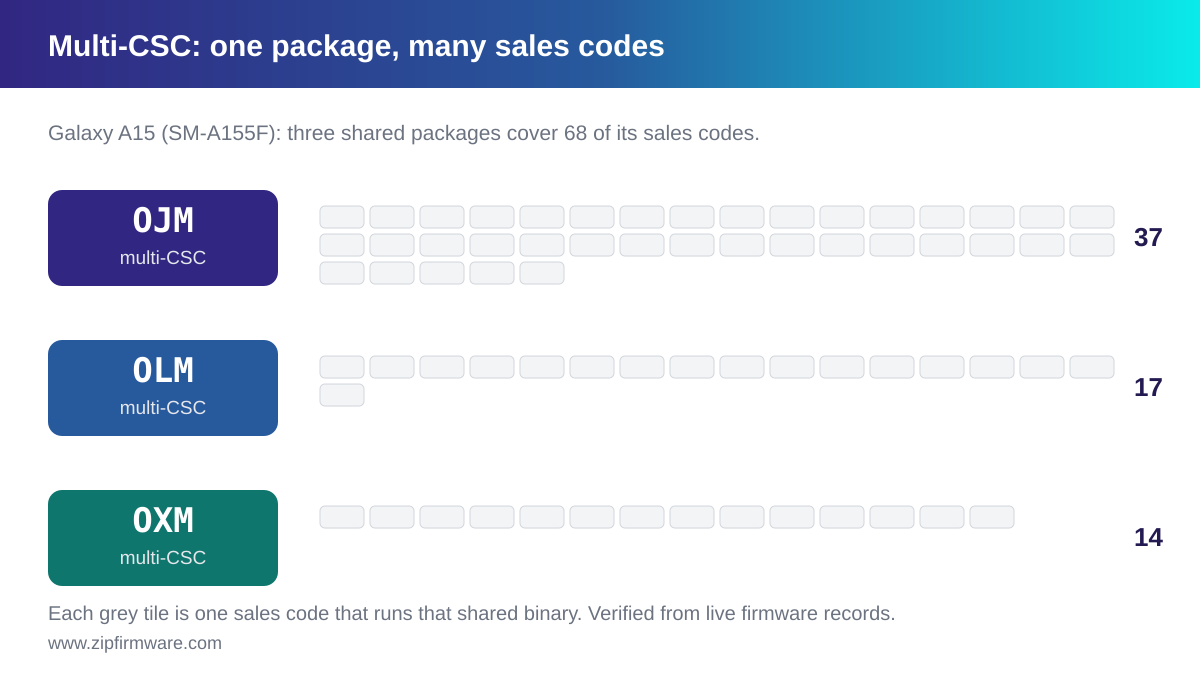
Samsung does not build a separate firmware for every one of those 599 codes. Many sales codes — the code a device was sold under — share a single multi-CSC package. That package carries the customisation data for every region it covers, and the device selects the right profile.
You can see this in the firmware itself. The second component of a Samsung version string is the CSC binary, and it names the CSC it was built for. Compare that against the sales codes a build is published under, and the grouping becomes visible.
A real example: Galaxy A15 (SM-A155F)
The groupings below come from Samsung firmware records indexed by ZipFirmware, not from a community list. Each sales code was checked against the CSC binary its own build actually ships.
| Multi-CSC in the build | Sales codes it serves | Count |
|---|---|---|
OJM |
ACR, AFG, AFR, ATO, AUT, BTU, DBT, DKR, ECT, EGY, FWD, ILO, ILP, ITV, KSA, LUX, LYS, MID, MWD, NEE, PAK, PHE, PHN, PKD, ROM, SAC, SEB, TMA, TMC, TUN, TUR, XEF, XEO, XFA, XFE, XFV, XSG | 37 |
OLM |
CAM, GLB, INS, INU, MM1, MYM, SIN, STH, THL, TLP, XID, XME, XNZ, XSE, XSP, XTC, XXV | 17 |
OXM |
BOG, CAU, EVR, MEO, MET, MSR, O2C, PLS, PRT, SER, SFR, SKZ, TOP, VIP | 14 |
VFJ |
VFJ | 1 |
OLE |
XID | 1 |
PNG |
PNG | 1 |
Read the first row carefully. A Galaxy A15 sold in Germany (DBT), the United Kingdom (BTU), France (XEF), Saudi Arabia (KSA), Morocco (MWD) and Turkey (TUR) all run the same OJM binary, whose CSC component reads A155FOJMAEZF1.
The last three rows show the opposite: single-CSC builds serving exactly one sales code.
What this means in practice
- Your download may not carry your own code. Searching for
DBTfirmware can legitimately return a build whose CSC component readsOJM. That is correct, not an error. - Moving between regions inside one multi-CSC group is simpler than crossing groups, because the customisation data is already in the package.
- Groupings differ per model. On the Galaxy A15 above,
OJMcovers 37 codes. On the Galaxy A01 Core (SM-A013G) the sameOJMcode covers a different set of 15. Never assume a grouping carries across devices.
The frequently cited codes OXM, OJM, OLM and OWO are multi-CSC packages of exactly this kind. You will find lists online claiming a fixed number of codes per package; the data above shows why such a list is unreliable — the membership depends on the model.
Reading the CSC out of a real firmware string
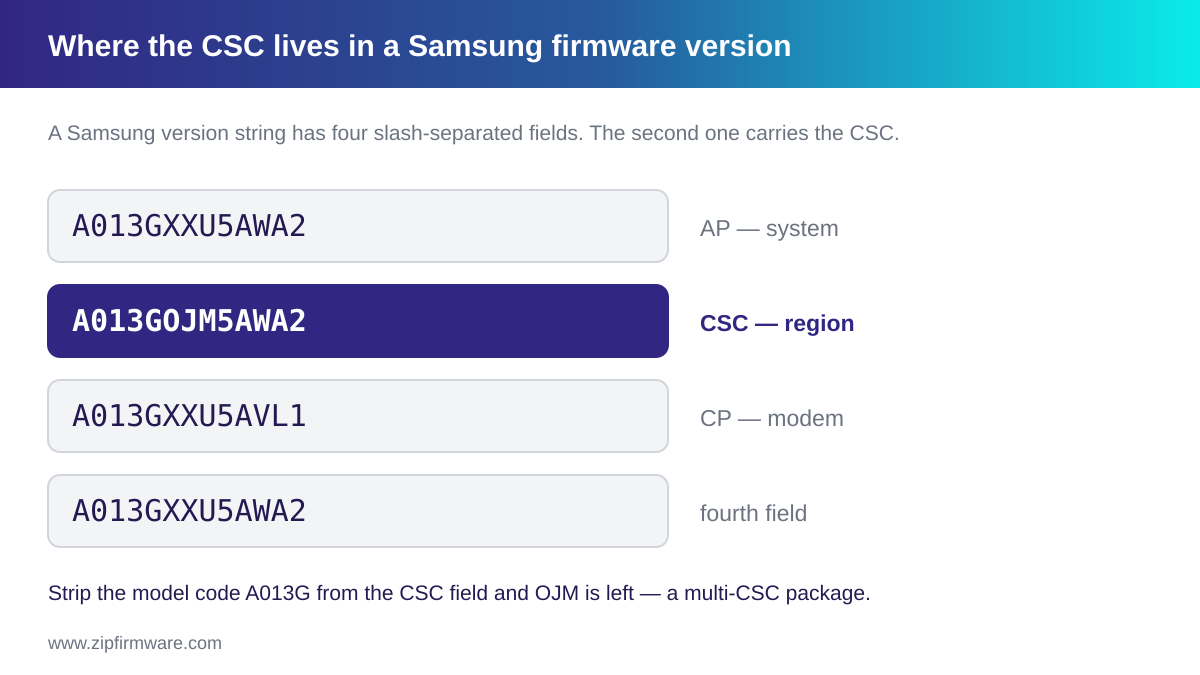
A Samsung firmware version is four values separated by slashes. The second is the CSC component, and it tells you which region customisation the build carries.
Here is a real Galaxy A01 Core record:
A013GXXU5AWA2 / A013GOJM5AWA2 / A013GXXU5AVL1 / A013GXXU5AWA2
| Position | Value | What it is |
|---|---|---|
| 1 | A013GXXU5AWA2 |
AP — the main system build |
| 2 | A013GOJM5AWA2 |
CSC — the region customisation |
| 3 | A013GXXU5AVL1 |
CP — the modem build |
| 4 | A013GXXU5AWA2 |
A fourth component; in this record it matches the AP value |
To extract the CSC, take the second value and strip the model code from the front. The model here is SM-A013G, so remove A013G from A013GOJM5AWA2; the next three characters are OJM, a multi-CSC package.
Compare a single-CSC build from the same family: A013FSER7AWA1. Strip A013F and you get SER, the Russian sales code appearing directly in its own firmware.
Once you can read that second field, you can tell at a glance whether a build is region-specific or shared.
How to check which CSC your phone is using now
There are two common routes. Menu wording varies between One UI versions and carrier builds, so treat the labels below as what to look for rather than an exact path.
Route 1: the software information screen
- Open Settings.
- Go to About phone.
- Open Software information.
- Find the Service provider SW ver. entry.
Your CSC appears in that value, alongside your model number. It is a three-letter code such as XAA, BTU, DBT or INS.
The surrounding string contains several fragments, and more than one three-letter group can appear in it. Rather than guessing which is which, match what you see against the country table below — the code that corresponds to a real region is the one you want.
Route 2: the dialer information code
On many Samsung devices, entering *#1234# in the dialer opens a read-only screen listing the AP, CP and CSC version strings. The CSC line is the one you want.
This code is not guaranteed to work on every device, and availability can depend on the carrier build. If nothing happens, use Route 1 instead.
A caution about dialer codes:
*#1234#only displays information. Other Samsung service codes open engineering menus that can change device settings or network configuration. Do not enter codes you cannot identify, and do not change values in menus you did not intend to open.
Active CSC versus original sales code
These are not always the same. The sales code is what the device was sold under. The active CSC is the customisation the device is running right now, and it changes if someone flashes a different region’s firmware.
When you are downloading firmware, the active CSC is the value that matters for compatibility. If you bought the device second-hand, do not assume the two match.
Finding the original CSC your device shipped with
This is harder than finding the active one, and it is worth being honest about the limits.
- The retail box is the most direct record. The label normally carries the sales code alongside the model and serial number.
- Samsung support or an authorised service centre can advise based on your serial number or IMEI. This is the appropriate route for a warranty or provenance question.
If the box is gone and the firmware has already been changed, there may be no reliable way to recover the original sales code from the device alone. Rather than guessing, treat the active CSC as your working value and confirm the original through Samsung if it genuinely matters.
Note also that multi-CSC complicates this: what you read back may be the shared package code such as OJM rather than the specific sales code your device was sold under.
Be cautious with third-party IMEI lookup services that promise to reveal original device details. Their accuracy varies, and submitting an IMEI to an unknown service has privacy implications.
Can you change your Samsung CSC?
Sometimes, with real trade-offs.
The supported route is to flash the complete firmware package built for the target region, including its CSC file. This is a normal Odin flash, and because it uses the full CSC rather than HOME_CSC, it erases the device.
Before considering it, understand the constraints:
- The hardware must actually match. A CSC change does not convert one hardware variant into another. If the target region’s devices use a different chipset or different radio hardware, that firmware is not for your phone.
- Carrier locks are unaffected. A device locked to a carrier stays locked regardless of which CSC it runs. Changing CSC is not an unlocking method, and this guide does not cover unlocking.
- Your update branch changes. After the change, the device follows the target region’s update schedule, for better or worse.
- Some devices resist it. Certain carrier variants, particularly in some markets, cannot be moved this way.
Moving inside an existing multi-CSC group is generally the least disruptive case, since the package already contains that region’s profile. Crossing into a different package is the more involved one.
Older Samsung devices historically exposed dialer menus for switching CSC directly. These are not available on modern devices, and chasing codes found on forums risks opening engineering menus that alter network settings. The firmware route is the one that still applies.
If you decide to proceed, the procedure is in how to flash Samsung firmware with Odin. Back up first.
What your CSC actually controls
Software updates
This is the effect most people notice. Update rollouts are staged per region, so the same model can sit on different builds in different markets. If your device seems to lag behind announcements, its CSC is usually the explanation. See how to update your Galaxy and One UI version history.
VoLTE and Wi-Fi calling
Carrier calling features depend on configuration the CSC carries. If the CSC does not correspond to the network you are actually using, VoLTE or Wi-Fi calling may not appear or may not work, even though the hardware supports them. This is one of the practical consequences of a mismatched CSC that people notice first — and a reason to be careful when buying an imported handset.
Samsung Wallet and payment features
Availability is region-restricted and depends on both the market and the device configuration. A device whose CSC belongs to a region where the service is not offered may not present it. Because the supported-country list changes over time, check Samsung’s current regional availability rather than relying on any static list.
Preloaded apps and defaults
Carrier builds add operator applications and set defaults for network configuration, APNs, and sometimes the default keyboard or browser. An unbranded regional code generally carries fewer of these than a carrier-specific one — which is why unbranded codes are often preferred.
Regional regulatory behaviour
Some markets impose local requirements that the regional configuration enforces. The best-known example is the mandatory camera shutter sound in certain countries, including Japan and South Korea, which cannot be disabled on devices configured for those regions.
Samsung CSC codes by country
The codes below are drawn from ZipFirmware’s verified CSC dataset, with the carriers recorded against each. This is a selection of widely encountered codes rather than the full 599.
| CSC | Country | Carrier / notes |
|---|---|---|
XAA |
United States | Unbranded |
ATT |
United States | AT&T |
TMB |
United States | T-Mobile |
VZW |
United States | Verizon Wireless |
SPR |
United States | Sprint |
BTU |
United Kingdom | O2, EE/T-Mobile, Vodafone, Virgin, BT Mobile, Tesco Mobile and others |
XEU |
United Kingdom | O2, Orange, T-Mobile, Virgin, Vodafone and others |
EVR |
United Kingdom | T-Mobile UK, Orange |
DBT |
Germany | Telekom, Vodafone, O2, 1&1 and others |
VD2 |
Germany | Vodafone |
XEF |
France | Orange, Bouygues Telecom, Free Mobile |
ITV |
Italy | Vodafone, WIND, Fastweb |
PHE |
Spain | Movistar, Vodafone, Orange, Yoigo and others |
XEO |
Poland | Plus, T-Mobile, Orange, Cyfrowy Polsat |
ETL |
Czechia | T-Mobile, O2, Vodafone |
SER |
Russia | MTS, Beeline, Megafon, Tele2 |
INS |
India | Airtel, BSNL, Vodafone Idea, Jio |
INU |
India | Unbranded |
PAK |
Pakistan | Jazz, Ufone, Zong, Telenor |
NPL |
Nepal | Nepal Telecom, Ncell, Smart Telecom, UTL |
XSG |
United Arab Emirates | Etisalat, VIVA, Ooredoo, Oman Mobile and others |
KSA |
Saudi Arabia | STC, Mobily, Zain |
EGY |
Egypt | Mobinil, Vodafone, Etisalat |
MID |
Iraq | Zain, Asia Cell, Korek and regional operators |
MWD |
Morocco | Unbranded |
ILO |
Israel | HotMobile |
THL |
Thailand | AIS, DTAC, True Move and others |
XME |
Malaysia | Celcom, Maxis, DiGi, U Mobile and others |
XID |
Indonesia | Indosat, Telkomsel, XL, 3, Axis |
XSP |
Singapore | M1, SingTel, StarHub and others |
BRI |
Taiwan | Chunghwa, KGT, Vibo |
TGY |
Hong Kong | CSL Mobile, 3, PCCW, China Mobile HK, SmarTone |
CHC |
China | Unbranded |
KOO |
South Korea | Unbranded |
SKC |
South Korea | SK Telecom |
XSA |
Australia | Telstra, Optus, TPG Telecom, Virgin Mobile, 3 |
ZTO |
Brazil | TIM, Claro, Vivo, Oi and others |
ARO |
Argentina | Personal, Claro, Movistar and others |
TPA |
Panama | Unbranded |
ACR |
Ghana | Unbranded |
Codes are reassigned and retired over time, and one country frequently has several. Canada and the United States each carry more than twenty in the dataset; France, the Netherlands, Germany and the United Kingdom each carry over a dozen. If your code is not listed, check the firmware page for your specific model.
Common CSC mistakes
- Assuming HOME_CSC always keeps your data. It only does so when the installed CSC matches. This is the costliest misunderstanding on this page.
- Assuming the sales code equals the active CSC. On a second-hand device, verify rather than assume.
- Treating a multi-CSC code as an error. Seeing
OJMwhere you expectedDBTis normal. - Copying a multi-CSC membership list from another model. Membership is model-dependent, as the Galaxy A15 data shows.
- Changing CSC to try to unlock a carrier-locked device. It does not work; the lock is separate.
- Entering unidentified dialer codes. Some open engineering menus that change network configuration.
Frequently asked questions
What does CSC stand for on a Samsung phone?
It is usually expanded as Country Specific Code or Consumer Software Customisation. Both are in common use; Samsung does not publish one canonical expansion. Functionally, it is the regional and carrier configuration your device runs.
How do I find my Samsung CSC code?
Open Settings → About phone → Software information and read the Service provider SW ver. entry. On many devices, entering *#1234# in the dialer also displays the AP, CP and CSC versions.
What is the difference between CSC and HOME_CSC?
CSC performs a factory reset when flashed. HOME_CSC is intended to preserve your data, but only when the CSC already installed matches the one being flashed. Back up regardless.
What is a Multi-CSC code like OXM or OJM?
A firmware package that carries the configuration for several regions at once, so many sales codes share one build. Which codes belong to which package depends on the model.
Can I change my CSC without losing data?
Generally no. A genuine region change uses the full CSC file, which erases the device. Treat data loss as the expected outcome and back up first.
Does changing CSC unlock a carrier-locked phone?
No. Carrier locking is independent of CSC and is unaffected by flashing a different region’s firmware.
Will the wrong CSC break VoLTE or Wi-Fi calling?
It can. Those features depend on carrier configuration the CSC carries, so a device whose CSC does not match the network in use may not offer them even though the hardware supports them.
Why does my firmware download show a different CSC than mine?
Because your device is served by a multi-CSC package. A build listed for your sales code can legitimately carry a shared CSC such as OJM or OXM in its version string.
Final thoughts
CSC looks like trivia until it costs you something: a wiped device because HOME_CSC was assumed to be safe, missing Wi-Fi calling on an imported handset, or a failed flash from a mismatched region. Understanding what the code is and how to read it out of a firmware string removes most of that risk.
Related reading:
- How to flash Samsung firmware with Odin
- Samsung firmware files explained: AP, BL, CP and CSC
- How to check your Samsung Galaxy’s firmware version
- How to update your Samsung Galaxy to the latest firmware
- One UI version history
- Samsung bootloader version guide
- How to fix SW REV CHECK FAIL
Browse the ZipFirmware archive to find firmware for your exact model and region.
ZipFirmware
We maintain the ZipFirmware archive of official Samsung stock ROMs. Every guide here is written from the same files you download.